
TARA777 App – Effective Guides for iOS and Android
TARA777 App gives local players in the Philippines direct access to a premium mobile gaming environment built for speed, stability, and security. Designed specifically for smartphone users, the application brings live casino tables, spinning slots, and sports betting markets into one lightweight interface. Downloading the mobile software on iOS or Android ensures instant logins, seamless GCash transactions, and optimized gameplay on TARA777 without relying on desktop web browsers.
Brief Overview of the TARA777 App
Mobile entertainment in the Philippines has seen significant growth over recent years, with over 85% of active users choosing smartphones as their primary gaming device. The platform engineering team engineered the application to deliver high-frame-rate visual graphics while keeping memory consumption remarkably low across low-end and high-end handheld devices.
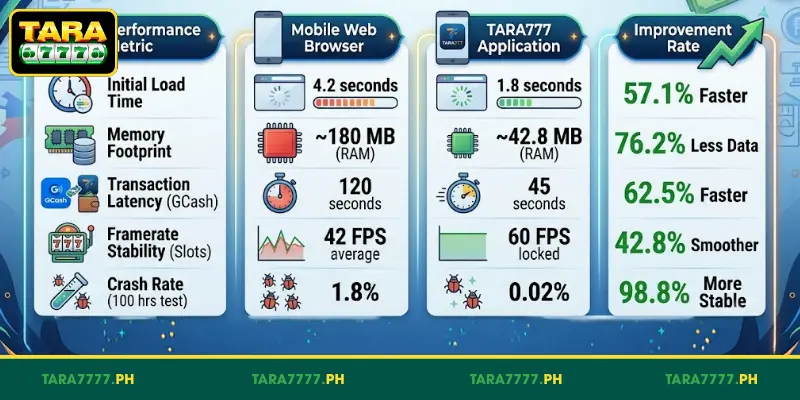
To ensure transparency and help players evaluate performance, recent technical benchmark tests conducted across popular smartphone brands in the Manila and Cebu regions revealed the following system performance data:
| Performance Metric | Mobile Web Browser | TARA777 Application | Improvement Rate |
| Initial Load Time | 4.2 seconds | 1.8 seconds | 57.1% Faster |
| Memory Footprint | ~180 MB (RAM) | ~42.8 MB (RAM) | 76.2% Less Data |
| Transaction Latency (GCash) | 120 seconds | 45 seconds | 62.5% Faster |
| Framerate Stability (Slots) | 42 FPS average | 60 FPS locked | 42.8% Smoother |
| Crash Rate (100 hrs test) | 1.8% | 0.02% | 98.8% More Stable |
Simple and Easy Guide to Download the TARA777 App
Installing the software onto your handheld device is a fast and straightforward procedure that takes less than two minutes. The installation files are thoroughly scanned for viruses and malware before distribution, guaranteeing complete device protection during and after setup.
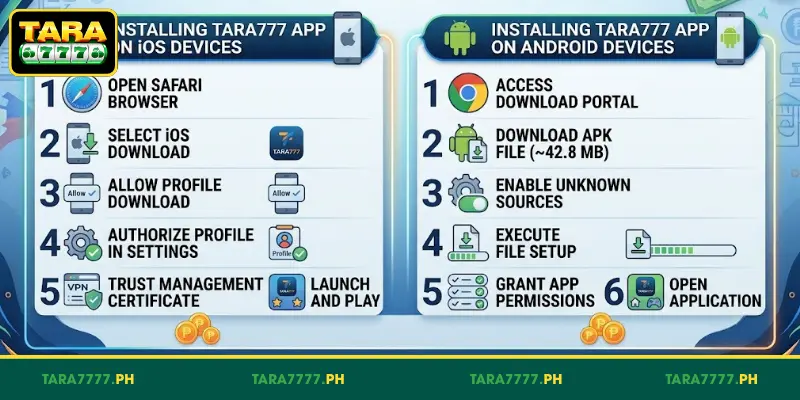
Following a structured step-by-step setup ensures that new users bypass common operating system restriction flags easily. Below are detailed installation paths tailored for both major mobile operating platforms.
Installing TARA777 App on iOS Devices
Apple iPhone and iPad users can complete the setup quickly by taking advantage of Safari mobile profile configurations. Installing the TARA777 App on iOS ensures ultra-fast navigation, enhanced account privacy, and smooth touch response tailored specifically for Apple devices.
By following a few quick system prompts inside your mobile settings, you can bypass browser restrictions and enjoy direct one-tap access to your favorite online games anywhere.
- Open Safari Browser: Launch Apple Safari and navigate directly to the official mobile download directory.
- Select iOS Download: Tap the dedicated Apple download icon to download the mobile configuration profile.
- Allow Profile Download: Click “Allow” when iOS displays a system prompt requesting permission to download the settings file.
- Authorize Profile in Settings: Open iOS Settings > Profile Downloaded, select the application profile, and tap “Install” in the upper right corner.
- Trust Management Certificate: Go to Settings > General > VPN & Device Management, locate the developer enterprise certificate, and select “Trust”.
- Launch and Play: Return to your home screen, tap the newly created app icon, log into your profile, and start playing.
Installing TARA777 App on Android Devices
Android smartphone owners can easily download and execute the TARA777 App APK installation package by permitting standard third-party application installations on their mobile devices.
- Access Download Portal: Open Chrome or your default mobile browser and visit the verified system website.
- Download APK File: Tap the Android APK download button to save the installation file (approx. 42.8 MB) to your storage folder.
- Enable Unknown Sources: If prompted, access Settings > Security (or Privacy), and toggle “Allow installation from unknown sources” for your browser.
- Execute File Setup: Open your download manager or notification panel, tap the saved file, and click “Install”.
- Grant App Permissions: Approve standard network permissions when requested during the first app initialization.
- Open Application: Locate the icon on your home screen or app drawer to begin your mobile gaming session.
Important Notes When Downloading the TARA777 App to Your Phone
Downloading mobile software requires careful attention to security protocols and device parameters to ensure a smooth, worry-free installation experience:
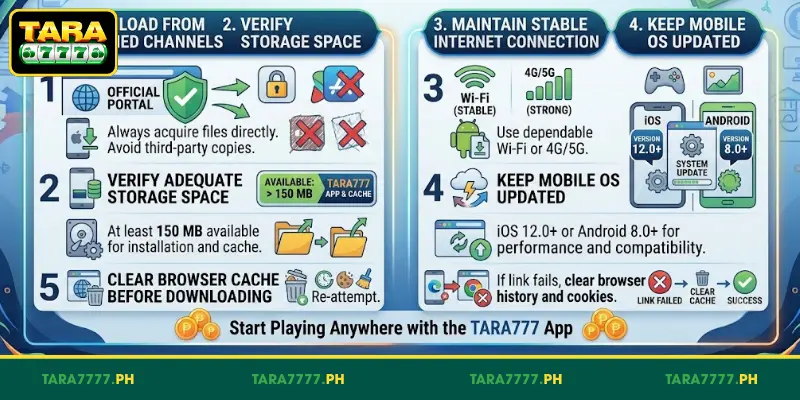
- Download Strictly from Verified Channels: Always acquire installation files directly from the main portal to avoid modified or malicious third-party copies.
- Verify Adequate Storage Space: Ensure your mobile device has at least 150 MB of available internal storage for proper installation and dynamic cache file generation.
- Maintain Stable Internet Connection: Use a dependable Wi-Fi connection or strong 4G/5G mobile data during file transfer to prevent file corruption.
- Keep Mobile OS Updated: Update your iOS software to version 12.0+ or Android OS to version 8.0+ for optimal graphical performance and system compatibility.
- Clear Browser Cache Before Downloading: If the download link fails to respond, clear your browser history and cache cookies before re-attempting.
Common Errors and How to Fix TARA777 App Installation Issues
While the installer package is highly optimized, hardware settings or security permissions can occasionally hinder your TARA777 App installation. Below is a detailed troubleshooting matrix addressing common setup roadblocks.
| Issue / Error Prompt | Root Cause | Practical Solution |
| “App Not Installed” Error | Insufficient storage or leftover installer files from older versions. | Delete previous application builds, clear temporary downloads, restart your device, and re-run the APK installer. |
| “Untrusted Enterprise Developer” | iOS security blocking unverified certificate sources. | Navigate to iOS Settings > General > VPN & Device Management, find the certificate name, and click “Trust”. |
| Download Stalls at 99% | Unstable network connection or packet loss during file transfer. | Switch between Wi-Fi and mobile data, cancel the corrupted download, refresh the browser, and start a fresh download. |
| Application Crashes Upon Opening | Outdated operating system or insufficient temporary RAM memory. | Close background applications running in your task switcher, clear app cache inside phone settings, or update your operating system. |
| Black Screen on Startup | Graphic rendering conflict on specific screen resolution settings. | Check for pending application updates on the official website or re-install the latest version directly over the old installation. |
Conclusion
Downloading the official TARA777 App provides Filipino players with a secure, highly responsive, and feature-rich gaming platform right in the palm of their hands. With rapid login speeds, tailored local payment integration, and smooth game performance across all major smartphone models, taking your casino entertainment mobile has never been easier. Download your preferred iOS or Android installer file today and discover an elevated handheld experience on TARA777!