
TARA777 Login – Secure and Fast Account Access Guide
Executing a TARA777 Login is an essential operation that opens up a rich, diverse, and exciting online entertainment hub for all registered members. The underlying system has been precisely optimized to ensure that the access process takes place smoothly within seconds. Let us explore the detailed login instructions at TARA777 to prepare yourself for an immediate, high-quality gaming experience today.
Step-by-Step Guide to Executing a TARA777 Login
To ensure that logging into your personal gaming account proceeds smoothly and without unexpected technical interruptions, simply follow the step-by-step instructions outlined in detail below.
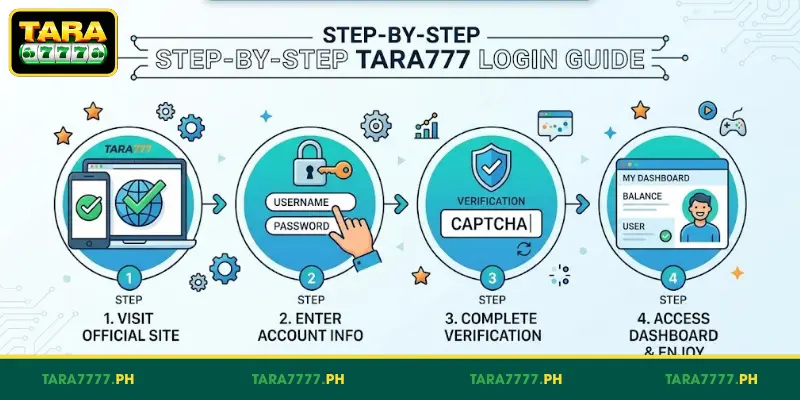
Step 1: Access the Correct Official Address
Players need to open their preferred mobile or desktop web browser to access the official homepage link of the platform directly. Choosing the correct web link helps you avoid potential security risks associated with brand impersonation sites.
The main user interface will clearly display a prominent login button right at the top right section of the screen. Every TARA777 Login action performed via verified links is strictly protected by advanced SSL encryption technology.
Always make sure to bookmark the official domain on your personal browser for quicker access in future sessions. This precaution ensures you never accidentally click on untrusted third-party search results or malicious redirect links.
Step 2: Enter Account Information
On the displayed login form, accurately enter your registered Username and personal Password into their respective fields. Make sure to pay close attention to uppercase letters, special characters, and numbers contained within your secret passphrase.
Entering incorrect information multiple times can cause the automated security system to temporarily lock your account for safety reasons. Double-check every single character before submitting to ensure your TARA777 Login succeeds on your very first attempt.
If you are using a personal, private device, you can utilize the browser’s credential saver for easier access next time. However, never save your login details on shared or public computers to maintain absolute account confidentiality.
Step 3: Complete Security Verification
After filling in your credentials, the system may prompt you to enter a CAPTCHA verification code displayed clearly on your screen. This crucial step prevents automated software tools and malicious bots from gaining unauthorized access.
Simply enter the exact string of characters or designated image pattern into the empty verification box provided. This quick step ensures that the TARA777 Login process achieves absolute security against unauthorized intrusions and cyber threats.
If the generated CAPTCHA code appears blurry or difficult to read, simply tap the refresh icon to generate a new one. Completing this verification promptly keeps your session active without timing out.
Step 4: Verify Access Status
Once security verification is complete, click the main “Login” button to submit your access request to the platform. The screen will automatically redirect to your personal user dashboard if your provided credentials are valid.
From here, you can check your wallet balance, update personal profile details, and jump straight into your favorite gaming lobbies. Completing your TARA777 Login unlocks an exclusive, smooth entertainment space tailored specifically for you.
Should your balance not reflect immediately upon entry, simply refresh your browser page or log out and log back in. Your account dashboard provides real-time updates for all your ongoing activities and bonuses.
How to Resolve Common TARA777 Login Issues
During the account access process, some users may run into unexpected technical glitches due to various network or user-side reasons. Here are practical tips to resolve TARA777 Login issues effectively and swiftly:
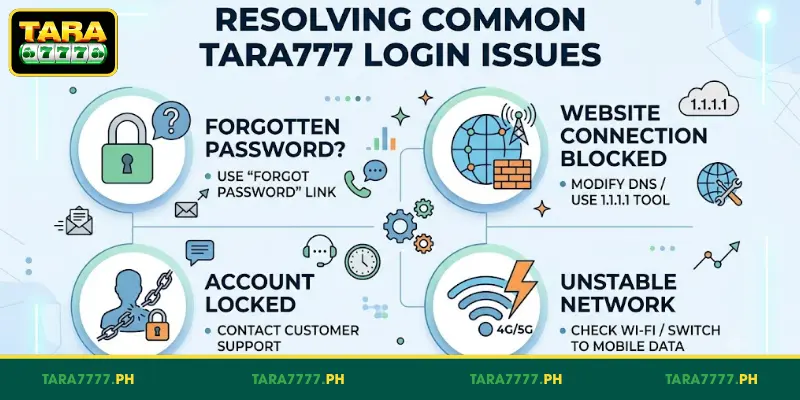
- Forgotten Personal Password: Click the “Forgot Password” link located directly below the form to receive password recovery instructions via your registered email or phone.
- Website Connection Blocked: Flexibly modify your mobile device’s DNS address or use a secure 1.1.1.1 network tool to restore smooth and uninterrupted access.
- Account Temporarily Locked: Contact the 24/7 customer support team immediately to verify your identity credentials and restore full account access.
- Unstable Network Connection: Check your local Wi-Fi signal or switch over to high-speed 4G/5G mobile data before tapping the login button again.
Frequently Asked Questions About TARA777 Account Access
New members often share common inquiries regarding security protocols and maintaining active login statuses. Below are detailed answers to common questions when TARA777 Login:
Can I log into one account on multiple devices simultaneously?
Access across different devices depends on the platform’s current account policies. Some systems may end an existing session when a new device logs in, while others may allow multiple active sessions. Check the account notices and avoid sharing login credentials with other people.
Can my registered username be changed after account creation?
Username changes depend on the platform’s account management rules. If the username cannot be edited through the profile settings, contact verified customer support to confirm whether an alternative is available. Avoid creating duplicate accounts simply to obtain a different username.
What Happens When I Fail to Log In Five Times?
Repeated incorrect entries may trigger additional security checks or a temporary access restriction. The exact threshold and waiting period depend on the platform’s policies. Check your username and password carefully, use the official recovery process if necessary, and contact support if the restriction remains in place.
Is logging in faster via the mobile app than the website?
Login speed depends on your device, internet connection, and the performance of the service. A compatible mobile app may retain an authorized session, reducing the need to enter credentials repeatedly. However, users should download applications only from verified sources and secure their devices with a screen lock.
How Can I Regain Access to My Account After Forgetting My Password?
Open the official login page and look for the password recovery option, if available. Follow the verification instructions using your registered contact details, then create a strong replacement password. If automated recovery is unavailable, contact the platform’s verified support team.
Conclusion
Executing your TARA777 Login accurately helps you manage your online betting account safely, efficiently, and conveniently. Optimized access procedures guarantee a smooth and thoroughly secured experience every time you return to TARA777. Access the platform today so you never miss out on any exciting gaming action and promotional opportunities!