TARA777 Deposit – Quick Instructions, Simple Operations
TARA777 Deposit gives mobile players in the Philippines a fast and secure way to fund their entertainment accounts in PHP. Whether you are using GCash, Maya, or local bank transfers, keeping your balance updated takes only a few minutes. Before you start playing your favorite live casino tables or online slots, knowing how to handle your TARA777 top-up safely ensures a smooth gaming experience from start to finish.
TARA777 Deposit Requirements for New Players
Before attempting your first TARA777 Deposit, it helps to review the core account requirements to prevent unnecessary transaction delays.
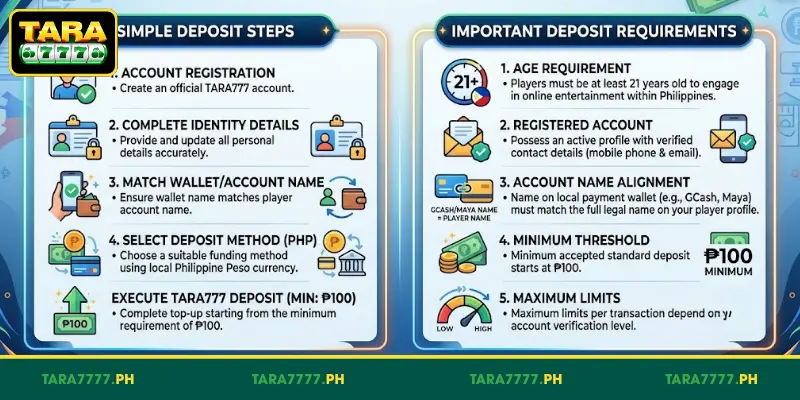
- Account Registration: Create an official account on the platform system.
- Complete Identity Details: Provide and update all personal verification details accurately.
- Match Wallet / Account Name: Ensure your digital wallet name matches your registered player account name.
- Select Deposit Method (PHP): Choose a suitable funding method using local Philippine Peso currency.
- Execute TARA777 Deposit (Min: ₱100): Complete the top-up starting from the minimum requirement of ₱100.
- Age Requirement: Players must be at least 21 years old to engage in online entertainment platforms within the Philippine jurisdiction.
- Registered Account: You must possess an active profile with verified contact details (mobile phone number and email).
- Account Name Alignment: The name registered on your local payment wallet (e.g., GCash or Maya) must match the full legal name on your player profile.
- Minimum Threshold: The minimum accepted transaction amount for a standard TARA777 Deposit starts at ₱100, while maximum limits per transaction depend on your account verification level.
| Payment Method | Min Deposit (PHP) | Max Deposit (PHP) | Processing Time | Success Rate |
| GCash | ₱100 | ₱50,000 | 1 – 3 mins | 99.2% |
| Maya | ₱100 | ₱50,000 | 1 – 3 mins | 98.8% |
| Bank Transfer | ₱500 | ₱100,000 | 5 – 15 mins | 96.5% |
| QR Ph Direct | ₱100 | ₱30,000 | Instant | 99.5% |
Step-by-Step Guide on How to Deposit at TARA777
Funding your balance is straightforward when you follow the structured workflow. Below is a comprehensive guide covering the full transaction cycle for new and returning users.
Step 1: Access TARA777
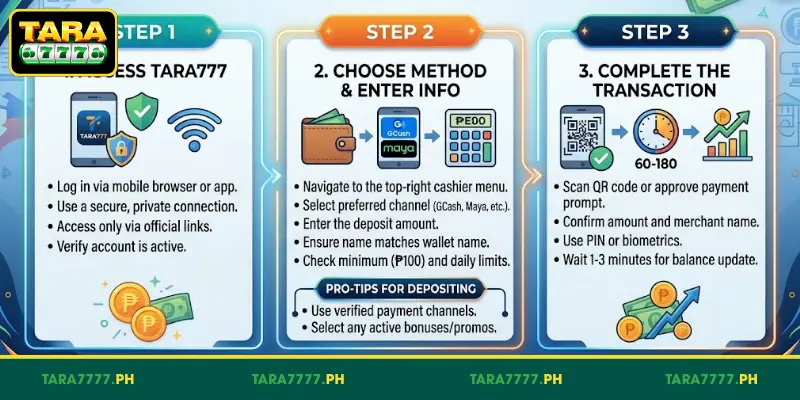
To initiate a TARA777 Deposit, open your mobile browser or launch the official application on your smartphone and log in using your registered credentials. Before proceeding, ensure that you are connected to a secure mobile data connection or an encrypted Wi-Fi network to protect your sensitive personal credentials during session authorization.
Accessing the portal via verified links helps guarantee a safe connection directly to the official cashier system. Once fully logged in, verify that your account profile status is active so your transaction can proceed without system flags.
Step 2: Choose Payment Method and Fill In Information
Navigate to the main cashier menu located conveniently at the top right corner of your account dashboard screen. Select your preferred local Philippine payment gateway—such as GCash, Maya, or QR Ph—and enter your intended funding amount carefully.
Always double-check all entered numbers against your personal gaming budget before advancing to the secure gateway prompt. Taking a quick moment to verify your input ensures you meet the minimum top-up requirements while preventing unwanted processing errors or accidental duplicate submissions.
To ensure your funding session goes as smoothly as possible, keep these key details in mind:
- Select verified payment channels: Choose active local e-wallets like GCash or Maya that match your registered profile name.
- Verify deposit limits: Ensure your entered amount meets the required minimum of ₱100 and fits within your daily limit.
- Check active bonuses: Select any available deposit incentives or promo codes prior to finalizing the transaction request.
- Review transfer details: Double-check the exact Peso amount to avoid unnecessary processing delays or transaction timeouts.
Step 3: Complete the Transaction
Scan the dynamic QR code displayed on your screen or approve the payment transfer prompt directly inside your GCash or online banking application. Make sure to double-check the recipient merchant name and final PHP amount before completing your authorization pin or biometric confirmation.
Once the transfer is approved, return immediately to the main merchant screen. Your updated balance should reflect inside your gaming wallet within 60 to 180 seconds, allowing you to start enjoying your favorite gaming titles right away.
Important Notes When Depositing Funds at TARA777
Executing a successful TARA777 Deposit consistently requires attention to minor operational details:
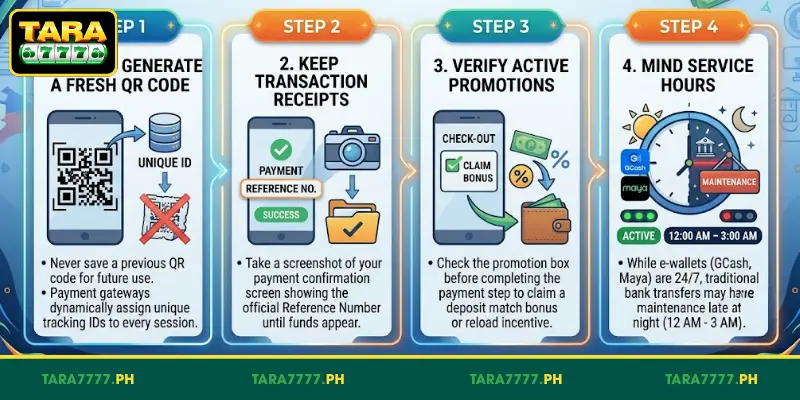
- Always Generate a Fresh QR Code: Never save a previous transaction QR code for future use, as payment gateways dynamically assign unique tracking IDs to every funding session.
- Keep Transaction Receipts: Take a screenshot of your payment confirmation screen showing the official Reference Number until your funds appear on your dashboard.
- Verify Active Promotions: If you wish to claim a deposit match bonus or reload incentive, check the promotion box before completing the final payment step.
- Mind Service Hours: While e-wallets like GCash operate 24/7, traditional bank transfers may undergo routine system maintenance during late night hours (typically 12:00 AM – 3:00 AM).
Common Errors and How to Fix Deposit Issues at TARA777
Even with high processing success rates for every TARA777 Deposit, occasional payment bottlenecks can occur due to network interruptions or third-party maintenance. Below are practical solutions for common funding issues.
| Common Deposit Error | Cause / Situation | Recommended Solution |
| Delayed Account Credit (Over 15 Minutes) | Payment processed but balance not updated due to gateway lag. | • Check if your GCash or bank balance was actually debited.
• Compare the Reference Number on your receipt with your transaction history. • Submit a ticket to Customer Support with the payment screenshot attached. |
| Payment Gateway Timeout | Poor network connection or temporary server maintenance. | • Refresh your browser page and clear cache files.
• Verify your mobile internet connection strength. • Avoid re-submitting payments immediately to prevent duplicate charges. |
| Incorrect Amount Inputted | Transferring an amount below the required minimum threshold (e.g., under ₱100). | • Contact live customer support immediately to manually verify and route the funds to your account balance. |
Conclusion
Completing your TARA777 Deposit via GCash or local bank options is fast, straightforward, and secure when following the correct steps. Always manage your gaming fund responsibly, keep your transaction receipts handy, and reach out to customer support if you encounter any processing delays. Enjoy your mobile entertainment on TARA777 with complete confidence!